
Statistics
Statistics are displayed in the description area of the active item, under the description. They are defined in the statistics list of an item.
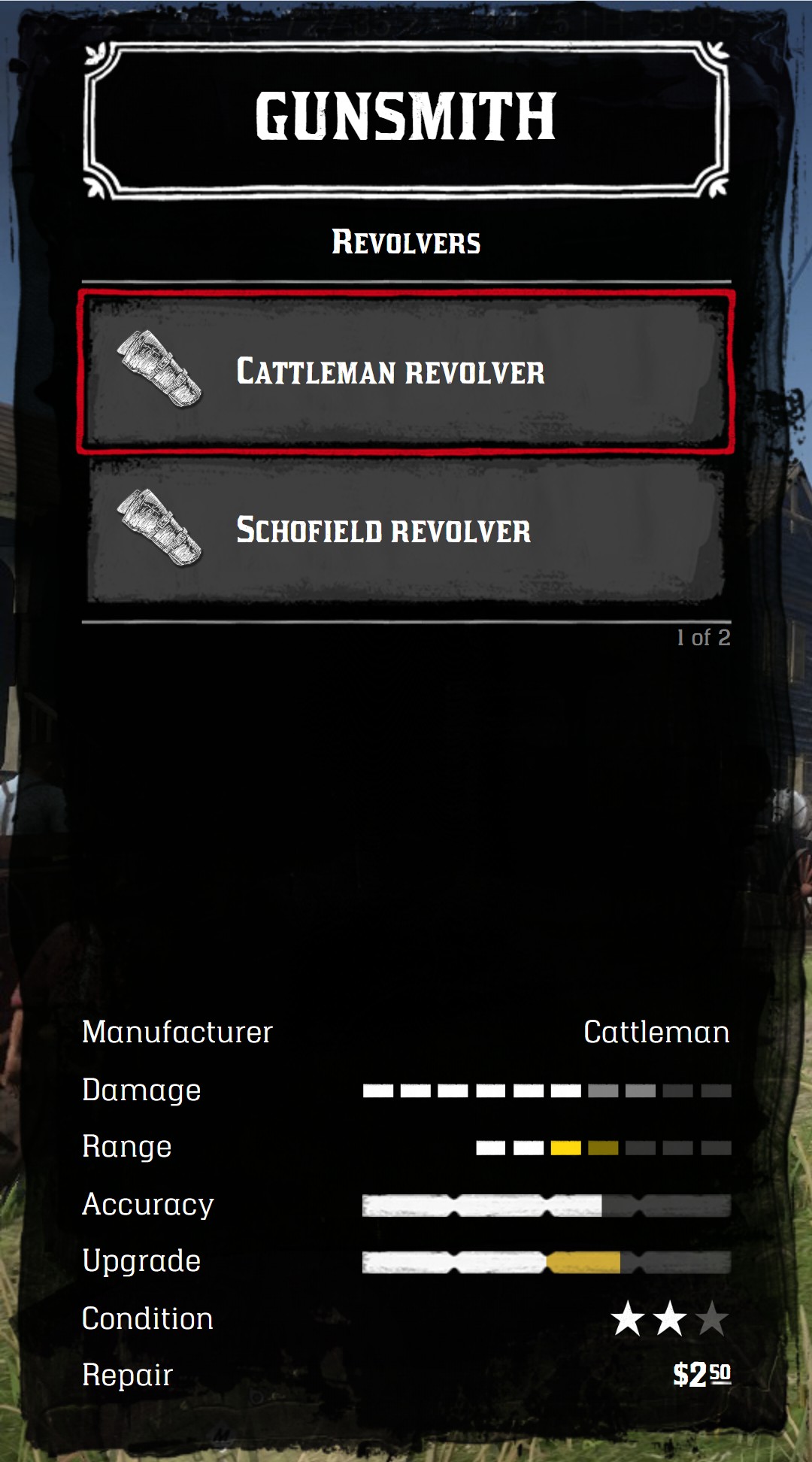
menu:addItem({
  title = "Cattleman revolver",
  icon = "holsters_left",
  statistics = {
    { label = "Manufacturer", value = "Cattleman" },
    { label = "Damage", type = "bar", value = { 6, 8 } },
    { label = "Range", type = "bar-style", value = { "active", "active", "active fgold", "possible fgold", "", "", "" } },
    { label = "Accuracy", type = "weapon-bar", value = { 65, 100 } },
    { label = "Upgrade", type = "weapon-bar", value = { max = 100, bars = { { value = 50 }, { value = 70, color = "#d4af37" } } } },
    { label = "Condition", type = "icon", value = { "star", "star", { icon = "star", opacity = 0.3 } } },
    { label = "Repair", type = "price", value = { money = 2.5 } },
  },
})| Type | Displays |
|---|---|
| Text | A text on the right |
bar | 10 bars, like the statistics of the weapons |
bar-style | Any number of bars, with a style per bar |
icon | A list of icons |
weapon-bar | A progress bar, with one or several segments |
price | A price |
Common keys
| Key | Type | Description |
|---|---|---|
label | string | The text on the left. HTML is allowed |
type | string | The type of statistic. Not needed for a text |
value | any | The value, depending on the type |
class | string | CSS classes of the statistic, like penalty for a bar Optional |
translateLabel | boolean | Use label as a key of the translations Optional default: false |
translateValue | boolean | Use value as a key of the translations (text only) Optional default: false |
Text
When value is a string or a number, it's displayed on the right. HTML is allowed.
statistics = {
  { label = "Manufacturer", value = "Cattleman" },
  { label = "Ammo", value = "<span style='color:#d4af37'>12</span> / 36" },
}
Bar
10 bars. value is {active, possible}:
active: the number of white bars,possible: the number of grey bars, up to this number Optional. It's useful to show the result of an upgrade.
statistics = {
  { label = "Damage", type = "bar", value = { 6 } },
  { label = "Fire rate", type = "bar", value = { 4, 7 } },
}
With class = "penalty", the possible bars are red: the statistic goes down.
{ label = "Reload speed", type = "bar", value = { 3, 6 }, class = "penalty" }
Bar style
Any number of bars, with a style per bar. value is a list of CSS classes, one per bar. The classes can be combined:
| Class | Effect |
|---|---|
"" | Empty bar |
active | White bar |
possible | Grey bar |
fgold | Gold color |
fred | Red color |
{
  label = "Range",
  type = "bar-style",
  value = { "active", "active fgold", "active fred", "possible", "possible fred", "", "" },
}
Icon
A list of icons. Each entry is an icon name, or a table {icon = name, opacity = 0.0 to 1.0}.
statistics = {
  { label = "Health", type = "icon", value = { "player_health", "player_health", { icon = "player_health", opacity = 0.3 } } },
  { label = "Stamina", type = "icon", value = { { icon = "player_stamina", opacity = 1 }, { icon = "player_stamina", opacity = 0.5 } } },
}
Weapon bar
The progress bar of the weapon statistics of the game. value is {current, max}.
{ label = "Accuracy", type = "weapon-bar", value = { 65, 100 } }
Several segments
To display several segments, like the result of an upgrade, value is a table:
| Key | Type | Description |
|---|---|---|
max | number | The value of a full bar |
bars | table | The segments, from left to right |
bars[].value | number | Where the segment ends. The values are cumulative: each segment starts where the previous one ends |
bars[].color | string | The CSS color of the segment Optional default: white |
bars[].opacity | number | The opacity of the segment, from 0 to 1 Optional default: 1 |
statistics = {
  {
    label = "Upgrade",
    type = "weapon-bar",
    value = {
      max = 100,
      bars = {
        { value = 40 }, -- white from 0 to 40
        { value = 60, color = "#27ae60" }, -- green from 40 to 60
        { value = 75, color = "#27ae60", opacity = 0.4 }, -- light green from 60 to 75
      },
    },
  },
  {
    label = "Downgrade",
    type = "weapon-bar",
    value = { max = 100, bars = { { value = 45 }, { value = 70, color = "#c0392b" } } },
  },
}
Price
value is a price, in any format described in Prices.
statistics = {
  { label = "Repair", type = "price", value = { money = 2.5 } },
  { label = "Upgrade", type = "price", value = { { money = 10 }, { gold = 1 } } },
}