# Input `[Client]`
A library to display native and NUI input panels.
## jo.input.loadNUI()
Loads the Input NUI.
**Syntax**
```lua
jo.input.loadNUI()
```
## jo.input.native()
Opens the native game input.
**Syntax**
```lua
jo.input.native(label, placeholder, maxStringLength)
```
**Parameters**
`label` : _string_
> Text displayed above the native input.
`placeholder` : _string_
> Placeholder displayed in the native input.
`maxStringLength` : _integer_ `[Optional]`
> Maximum number of characters. Defaults to `60`.
**Return Value**
Type : _string_
The entered text, or an empty string when the input is cancelled.
## jo.input.nui()
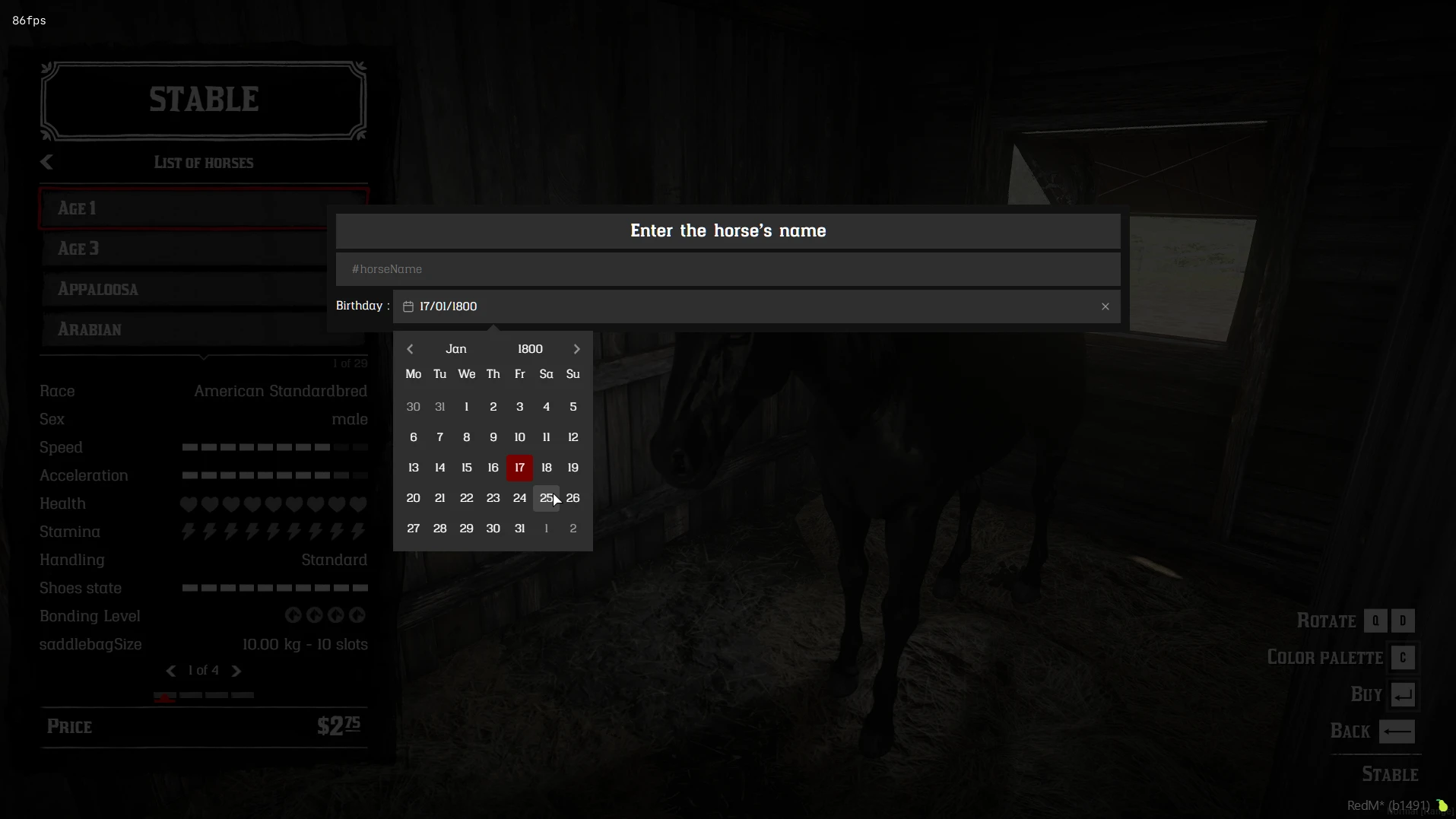
Opens a NUI input panel containing one or more rows of entries.
 **Syntax**
```lua
jo.input.nui(options, cb)
```
### Parameters
`options` : _table_
```lua
{
rows = { -- list of row objects
{
position = "content", -- "header", "content" or "footer"
columns = { -- entries rendered in this row
{ type = "title", value = "Enter the horse's price" },
},
},
},
lang = Lang, -- optional translations
}
```
Each row is an object with a `columns` array. `position` is optional and defaults
to `"content"`:
- `"header"`: fixed content above the scrollable area;
- `"content"`: main scrollable area;
- `"footer"`: fixed content below the scrollable area.
When `lang` is provided, only string keys prefixed with `inputNui` are sent to
the NUI for translation.
`cb` : _function_ `[Optional]`
> Callback receiving the result. When omitted, `jo.input.nui` waits synchronously and returns the result.
### Common entry properties
Entries can use the following shared properties:
```lua
{
id = "entry_id", -- identifier used by labels and in the result
class = "custom-class", -- CSS class or built-in class
style = { -- inline CSS properties
color = "#f0c674",
},
width = 50, -- number = percentage, string = CSS width
}
```
`id` must be unique when it is used as a label target or when the value is read
from the result. `style` is a Lua table of CSS properties, not a CSS string.
### Example
```lua
local Lang = {
inputNuiPaymentOptions = "Payment options",
inputNuiOrExplanation = "Set how the price can be paid",
}
local options = {
lang = Lang,
rows = {
{
position = "header",
columns = {
{ type = "title", value = "Enter the horse's price" },
{ type = "description", value = "Complete the form below" },
},
},
{
columns = {
{ type = "label", value = "Name:", target = "name", width = 10 },
{
type = "text",
id = "name",
placeholder = "A horse name",
required = true,
},
},
},
{
columns = {
{ type = "label", value = "Birthday:", target = "birthday", width = 10 },
{
type = "date",
id = "birthday",
placeholder = "Select a date",
yearRange = { 1800, 1900 },
format = "dd/MM/yyyy",
required = true,
},
},
},
{
columns = {
{ type = "label", value = "Choice:", target = "choice", width = 10 },
{
type = "select",
id = "choice",
placeholder = "Choose an option",
options = {
{ value = 1, label = "Option 1" },
{ value = 2, label = "Option 2" },
},
required = true,
},
},
},
{
position = "footer",
columns = {
{
type = "button",
id = "confirm",
value = "Confirm",
icon = "nui://jo_libs/nui/input/assets/ui/tick.png",
class = "success",
},
{
type = "button",
id = "close",
value = "Close",
class = "flat",
ignoreRequired = true,
},
},
},
},
}
-- Synchronous
local input = jo.input.nui(options)
if input then
log("Button pressed:", input.action)
log(input.result)
end
-- Asynchronous
jo.input.nui(options, function(input)
if input then
log(input.action, input.result)
end
end)
```
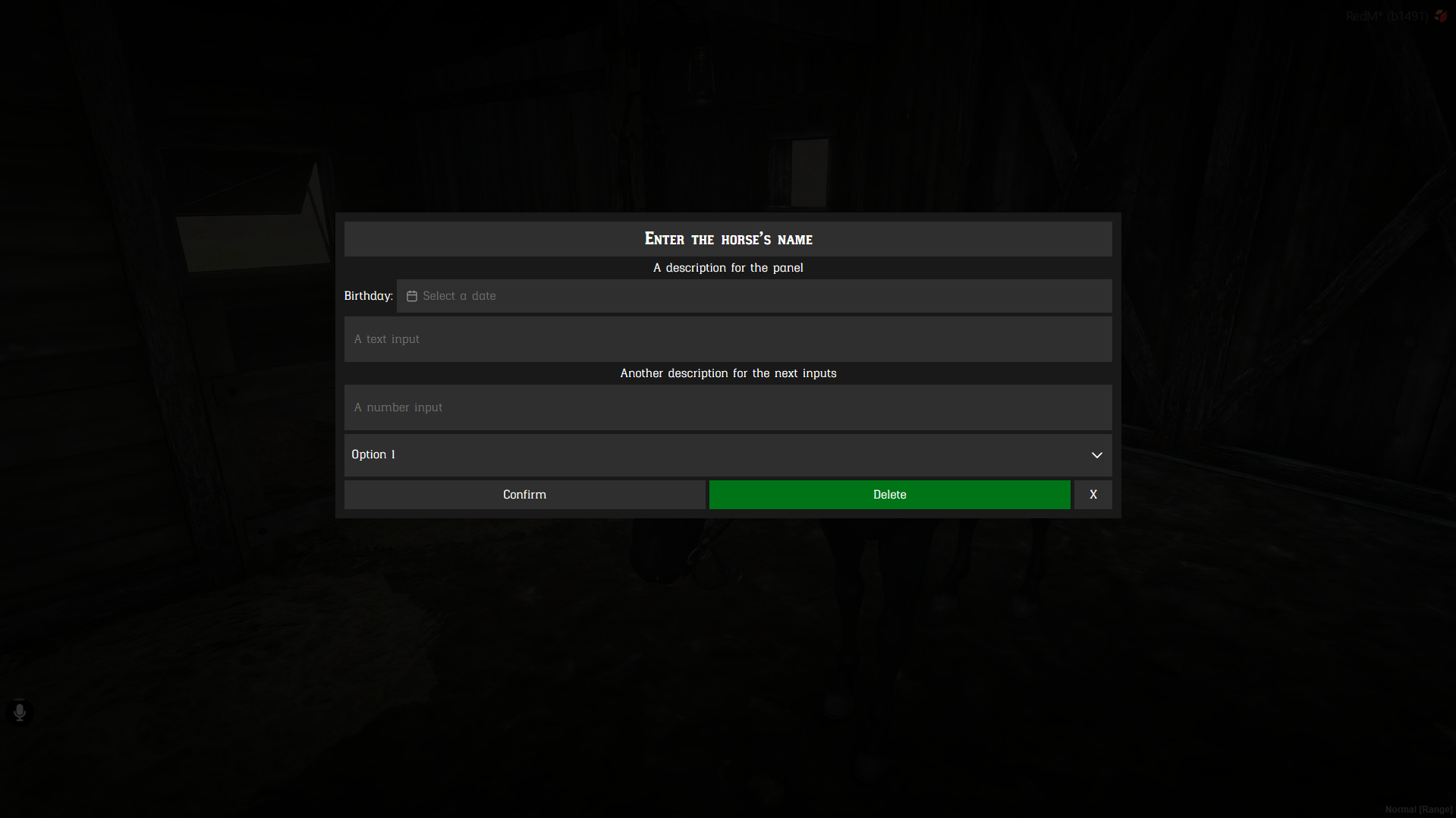
Preview:
**Syntax**
```lua
jo.input.nui(options, cb)
```
### Parameters
`options` : _table_
```lua
{
rows = { -- list of row objects
{
position = "content", -- "header", "content" or "footer"
columns = { -- entries rendered in this row
{ type = "title", value = "Enter the horse's price" },
},
},
},
lang = Lang, -- optional translations
}
```
Each row is an object with a `columns` array. `position` is optional and defaults
to `"content"`:
- `"header"`: fixed content above the scrollable area;
- `"content"`: main scrollable area;
- `"footer"`: fixed content below the scrollable area.
When `lang` is provided, only string keys prefixed with `inputNui` are sent to
the NUI for translation.
`cb` : _function_ `[Optional]`
> Callback receiving the result. When omitted, `jo.input.nui` waits synchronously and returns the result.
### Common entry properties
Entries can use the following shared properties:
```lua
{
id = "entry_id", -- identifier used by labels and in the result
class = "custom-class", -- CSS class or built-in class
style = { -- inline CSS properties
color = "#f0c674",
},
width = 50, -- number = percentage, string = CSS width
}
```
`id` must be unique when it is used as a label target or when the value is read
from the result. `style` is a Lua table of CSS properties, not a CSS string.
### Example
```lua
local Lang = {
inputNuiPaymentOptions = "Payment options",
inputNuiOrExplanation = "Set how the price can be paid",
}
local options = {
lang = Lang,
rows = {
{
position = "header",
columns = {
{ type = "title", value = "Enter the horse's price" },
{ type = "description", value = "Complete the form below" },
},
},
{
columns = {
{ type = "label", value = "Name:", target = "name", width = 10 },
{
type = "text",
id = "name",
placeholder = "A horse name",
required = true,
},
},
},
{
columns = {
{ type = "label", value = "Birthday:", target = "birthday", width = 10 },
{
type = "date",
id = "birthday",
placeholder = "Select a date",
yearRange = { 1800, 1900 },
format = "dd/MM/yyyy",
required = true,
},
},
},
{
columns = {
{ type = "label", value = "Choice:", target = "choice", width = 10 },
{
type = "select",
id = "choice",
placeholder = "Choose an option",
options = {
{ value = 1, label = "Option 1" },
{ value = 2, label = "Option 2" },
},
required = true,
},
},
},
{
position = "footer",
columns = {
{
type = "button",
id = "confirm",
value = "Confirm",
icon = "nui://jo_libs/nui/input/assets/ui/tick.png",
class = "success",
},
{
type = "button",
id = "close",
value = "Close",
class = "flat",
ignoreRequired = true,
},
},
},
},
}
-- Synchronous
local input = jo.input.nui(options)
if input then
log("Button pressed:", input.action)
log(input.result)
end
-- Asynchronous
jo.input.nui(options, function(input)
if input then
log(input.action, input.result)
end
end)
```
Preview:
 ### Entry types
#### Title
```lua
{
type = "title",
value = "Enter the horse's price",
class = "custom-class", -- optional
style = {}, -- optional CSS properties
}
```
#### Description
```lua
{
type = "description",
value = "Complete the form below",
class = "custom-class", -- optional
style = {}, -- optional CSS properties
}
```
#### Label
Use `target` to associate a label with the `id` of an input, select, or date
entry.
```lua
{
type = "label",
value = "Birthday:",
target = "birthday",
class = "custom-class", -- optional
style = {}, -- optional CSS properties
}
```
#### Text
```lua
{
type = "text",
id = "name",
value = "", -- optional initial value
placeholder = "A name", -- optional
required = true, -- optional
class = "custom-class", -- optional
style = {}, -- optional CSS properties
}
```
#### Number
```lua
{
type = "number",
id = "amount",
value = 0, -- optional initial value
min = 0, -- optional
max = 10, -- optional
step = 0.01, -- optional
placeholder = "An amount", -- optional
required = true, -- optional
class = "custom-class", -- optional
style = {}, -- optional CSS properties
}
```
#### Date
```lua
{
type = "date",
id = "birthday",
value = "", -- optional initial value
yearRange = { 1800, 1900 }, -- optional
format = "dd/MM/yyyy", -- optional display and model format
placeholder = "Select a date", -- optional
required = true, -- optional
class = "custom-class", -- optional
style = {}, -- optional CSS properties
}
```
#### Select
```lua
{
type = "select",
id = "choice",
value = { value = 1, label = "Option 1" }, -- optional initial value
options = {
{ value = 1, label = "Option 1" },
{ value = 2, label = "Option 2" },
},
placeholder = "Choose an option", -- optional
required = true, -- optional
class = "custom-class", -- optional
style = {}, -- optional CSS properties
}
```
#### Price
```lua
{
type = "price",
id = "price",
value = {
costs = {
{ money = 10 },
{ item = "horse_license", quantity = 1, keep = true },
},
},
options = { "money", "gold", "rol", "item" }, -- optional
allowOR = true, -- optional, defaults to true
required = true, -- optional
class = "custom-class", -- optional
style = {}, -- optional CSS properties
}
```
#### Button
Buttons are clickable entries. They remain real HTML buttons and can be
activated with the mouse or keyboard.
```lua
{
type = "button",
id = "confirm",
value = "Confirm",
icon = "nui://jo_libs/nui/input/assets/ui/tick.png", -- optional URL
class = "success", -- optional
style = {}, -- optional CSS properties
width = 25, -- optional
ignoreRequired = false, -- optional
}
```
`icon` accepts a web URL or a NUI URL. The button classes included by the Input
NUI are:
| Class | Appearance and use |
| --- | --- |
| `success` | Positive or confirmation action |
| `danger` | Destructive or irreversible action |
| `warning` | Action requiring attention |
| `muted` | Secondary action with reduced emphasis |
| `flat` | Text-only action without the textured button surface |
Classes can be combined with custom classes, and `style` can override the
button's inline CSS properties or button CSS variables.
Both `button` and `action` are valid values for the entry `type`.
### Return
When the panel is cancelled with `Escape`, the result is `false`.
When the panel is confirmed by a button, the result is:
```lua
{
action = "confirm", -- id of the button pressed
result = {
name = "Bucephalus",
birthday = "01/01/1885",
choice = { value = 1, label = "Option 1" },
},
}
```
### Entry types
#### Title
```lua
{
type = "title",
value = "Enter the horse's price",
class = "custom-class", -- optional
style = {}, -- optional CSS properties
}
```
#### Description
```lua
{
type = "description",
value = "Complete the form below",
class = "custom-class", -- optional
style = {}, -- optional CSS properties
}
```
#### Label
Use `target` to associate a label with the `id` of an input, select, or date
entry.
```lua
{
type = "label",
value = "Birthday:",
target = "birthday",
class = "custom-class", -- optional
style = {}, -- optional CSS properties
}
```
#### Text
```lua
{
type = "text",
id = "name",
value = "", -- optional initial value
placeholder = "A name", -- optional
required = true, -- optional
class = "custom-class", -- optional
style = {}, -- optional CSS properties
}
```
#### Number
```lua
{
type = "number",
id = "amount",
value = 0, -- optional initial value
min = 0, -- optional
max = 10, -- optional
step = 0.01, -- optional
placeholder = "An amount", -- optional
required = true, -- optional
class = "custom-class", -- optional
style = {}, -- optional CSS properties
}
```
#### Date
```lua
{
type = "date",
id = "birthday",
value = "", -- optional initial value
yearRange = { 1800, 1900 }, -- optional
format = "dd/MM/yyyy", -- optional display and model format
placeholder = "Select a date", -- optional
required = true, -- optional
class = "custom-class", -- optional
style = {}, -- optional CSS properties
}
```
#### Select
```lua
{
type = "select",
id = "choice",
value = { value = 1, label = "Option 1" }, -- optional initial value
options = {
{ value = 1, label = "Option 1" },
{ value = 2, label = "Option 2" },
},
placeholder = "Choose an option", -- optional
required = true, -- optional
class = "custom-class", -- optional
style = {}, -- optional CSS properties
}
```
#### Price
```lua
{
type = "price",
id = "price",
value = {
costs = {
{ money = 10 },
{ item = "horse_license", quantity = 1, keep = true },
},
},
options = { "money", "gold", "rol", "item" }, -- optional
allowOR = true, -- optional, defaults to true
required = true, -- optional
class = "custom-class", -- optional
style = {}, -- optional CSS properties
}
```
#### Button
Buttons are clickable entries. They remain real HTML buttons and can be
activated with the mouse or keyboard.
```lua
{
type = "button",
id = "confirm",
value = "Confirm",
icon = "nui://jo_libs/nui/input/assets/ui/tick.png", -- optional URL
class = "success", -- optional
style = {}, -- optional CSS properties
width = 25, -- optional
ignoreRequired = false, -- optional
}
```
`icon` accepts a web URL or a NUI URL. The button classes included by the Input
NUI are:
| Class | Appearance and use |
| --- | --- |
| `success` | Positive or confirmation action |
| `danger` | Destructive or irreversible action |
| `warning` | Action requiring attention |
| `muted` | Secondary action with reduced emphasis |
| `flat` | Text-only action without the textured button surface |
Classes can be combined with custom classes, and `style` can override the
button's inline CSS properties or button CSS variables.
Both `button` and `action` are valid values for the entry `type`.
### Return
When the panel is cancelled with `Escape`, the result is `false`.
When the panel is confirmed by a button, the result is:
```lua
{
action = "confirm", -- id of the button pressed
result = {
name = "Bucephalus",
birthday = "01/01/1885",
choice = { value = 1, label = "Option 1" },
},
}
```