# :necktie: Clothing Store
Documentation relating to the jo_clothingstore.
:::: tabs
::: tab BUY
[Buy the script](https://jumpon-studios.com/redm/clothing-store)
:::
::: tab PREVIEW
:::
::::
## 1. Installation
jo_clothingstore works on all frameworks compatible with jo_libs ([the list](/jo_libs/)).
To install jo_clothingstore:
- Download the library: [jo_libs](https://github.com/Jump-On-Studios/RedM-jo_libs/releases/latest/download/jo_libs.zip)
- Unzip the folder and drop it in your resource folder
- Download jo_clothingstore from your [account](https://jumpon-studios.com/account).
- Unzip the folder and drop it in your resource folder
- Add this ensure in your server.cfg
- `ensure jo_libs`
- `ensure jo_clothingstore`
::: details For RedEM:RP (old only)
You have to edit the keep the ensure of redemrp_clothing and replace it with this empty resource :
https://github.com/Jump-On-Studios/redemrp_clothing/releases
:::
::: details For VORP
To fix clothes and skin, you have to edit four files :
:::code-group
```lua:line-numbers=403 [vorp_character/client/client.lua]
LoadCharacterSelect(playerPed, value.skin, value.components)
CachedSkin = value.skin
canContinue = false
ApplyFaceOverlays(value.skin)
canContinue = true
FaceOverlay("grime", value.skin.grime_visibility, value.skin.grime_tx_id, 0, 0, 0, 1.0, 0, 1, 0, 0, 0, 1, value.skin.grime_opacity)
Wait(500)
TriggerServerEvent("jo_libs:server:vorp:applySkinAndClothes", value.charIdentifier, playerPed) -- [!code ++]
Wait(2000) -- [!code ++]
IsPedReadyToRender(playerPed) -- [!code ++]
data.PedHandler = ClonePed(playerPed, false, false, false, false)
```
```lua:line-numbers=3 [vorp_character/config_shops.lua]
ConfigShops.UseShops = false --turn off VORP clothing store
```
:::
::: details for RSG
The script is plug and play for RSG. You only have to disable the RSG clothing store and wardrobe.
:::code-group
```lua:line-numbers=147 [rsg_appearance/config.lua]
RSG.Zones1 = {}
RSG.Cloakroom = {}
```
:::
:::warning ⚠ Using clothes as items
If you want to use clothes as items. You have to create some items. The list of items is in `Config.clothesItem` variable in the config file `items.lua`.
:::
Congratulation, the **Clothing Store** script is ready to be used!
## 2. Usage
:::: tabs
::: tab 📍 Find a store
Clothing stores are marked on the map with a tailor blip icon. By default, there are 4 store locations:
- **Valentine**
- **Saint Denis**
- **Blackwater**
- **Tumbleweed**
Approach the catalog book in the store and a prompt will appear when you're close enough.
:::
::: tab 🛒 Store features
In the clothing store, you can:
- **Buy clothes** - Browse and purchase new clothing items by category
- **Resell clothes** - If enabled, sell back owned items
- **Manage outfits** - Create, save, and equip complete outfits
- **Create male or female outfits** - Choose the outfit sex before opening the outfit creator
- **Clothes manager** - Adjust wearable states (rolled sleeves, open collar, etc.)
Use the prompts displayed on screen to navigate, zoom, rotate your character, and purchase items.
Clothes are displayed as a grid of thumbnails (`Config.useThumbnails`), loaded from our CDN: nothing to install. Each category uses one of four kinds of thumbnail (`Config.thumbnailsType`): the cloth alone or worn by a mannequin, at rest or in the idle pose. The variations slider shows their colors or their thumbnails (`Config.variationsSlider`).
| `base` | `idle` | `base_body` | `idle_body` |
|:---:|:---:|:---:|:---:|
| 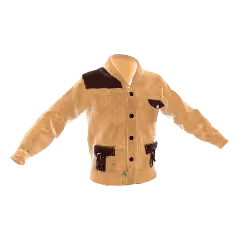 | 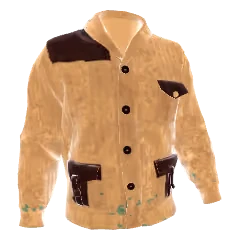 | 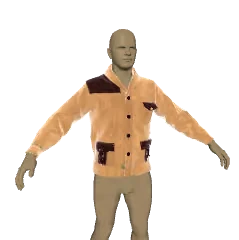 | 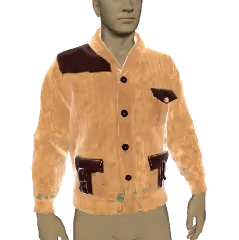 |
To use your own image for a cloth (an `https://` URL or a `nui://` file), set it in `Config.thumbnailsOverride` (`thumbnail.lua`), for a whole model or a single variation.
When creating an outfit, players can select **Male** or **Female** before entering the outfit creator. If the selected sex is different from the player's current character, the preview is displayed on a temporary mannequin so players can build the outfit without changing their character.
:::
::: tab 📍 Find a wardrobe
Wardrobes allow you to access your purchased clothes without buying new ones. They are marked on the map with a wardrobe blip icon.
Approach a wardrobe location and a prompt will appear to open the menu.
:::
::: tab 👕 Wardrobe features
In the wardrobe, you can:
- **Equip owned clothes** - Browse and wear clothes you've already purchased
- **Manage outfits** - Create, save, delete, and equip saved outfits
- **Preview saved outfits by sex** - Opposite-sex outfits remain visible in the outfit list for preview
- **Clothes manager** - Adjust wearable states (rolled sleeves, open collar, etc.)
Note: You cannot buy new clothes from a wardrobe, only from stores.
Saved outfits display a male or female icon. Outfits matching the current character sex can be equipped directly. Opposite-sex outfits are listed separately and can be previewed on a mannequin, but they cannot be equipped on the current character.
:::
::: tab 💬 Commands
The script provides chat commands to quickly toggle clothing on/off:
- `/rac` - Refresh all clothes (use `/rac 0` to only update wearable states)
- `/` - Toggle specific clothing category (e.g., `/hats`, `/coats`, `/masks`)
- `/neckwear 0` or `/neckwear 1` - Lower or raise neckwear
Commands can be customized or disabled in the configuration.
:::
::::
## 3. Configuration
The configuration files are located in the `config` folder within the resource. This folder contains two subfolders:
- **`_default.lock/`** - Contains the default configuration files. **Do not edit these files directly** as they may be overwritten during updates.
- **`custom/`** - This is where you place your custom configuration files to override the defaults.
### How to customize the configuration
1. Navigate to `jo_clothingstore/config/_default.lock/`
2. Copy the file you want to modify (e.g., `prices.lua`)
3. Paste it into `jo_clothingstore/config/custom/`
4. Edit the copied file in the `custom` folder
The script automatically loads files from `custom/` first, and only uses `_default.lock/` as a fallback. This system ensures your customizations are preserved when updating the script.
### Default configuration files
`jo_clothingstore/config/_default.lock/commands.lua`
```lua
Config.commands = { --Chat commands configuration, set false to disable all commands
refreshAllClothes = "rac", --Command to refresh all clothes, use "/rac 0" to only update wearable states
openFixBodyParts = "fixBodyParts",
clothes = { --Commands to toggle equip/unequip clothing categories, set false to disable a command
gloves = "gloves", --Toggle gloves on/off
eyewear = "eyewear",
dresses = "dresses",
shirts_full = "shirts_full",
armor = "armor",
gauntlets = "gauntlets",
suspenders = "suspenders",
neckties = "neckties",
neckwear = "neckwear", --Accepts 0 (down) or 1 (up) as argument
vests = "vests",
coats = "coats",
coats_closed = "coats_closed",
cloaks = "cloaks",
ponchos = "ponchos",
masks = "masks",
masks_large = "masks_large",
hats = "hats",
accessories = "accessories",
loadouts = "loadouts",
satchels = "satchels",
jewelry_rings_right = "jewelry_r",
jewelry_rings_left = "jewelry_l",
jewelry_bracelets = "bracelets",
aprons = "aprons",
pants = "pants",
skirts = "skirts",
belts = "belts",
belt_buckles = "belt_buckles",
gunbelts = "gunbelts",
holsters_left = "holsters",
boots = "boots",
boot_accessories = "boot_accessories",
spats = "spats",
chaps = "chaps",
badges = "badges",
gunbelt_accs = "gunbelt_accs",
hair_accessories = "hair_accessories",
shawls = "shawls"
},
}
```
`jo_clothingstore/config/_default.lock/global.lua`
```lua
Config.debug = false --Enable debug mode for development and troubleshooting
Config.blipSprite = "blip_shop_tailor" --Blip icon for clothing stores on the map
Config.blipSpriteWardrobes = "blip_shop_wardrobe" --Blip icon for wardrobes on the map
Config.displayOutfitId = false --Display outfit database ID in the outfit menu
Config.percentResell = 0.33 --Resell price percentage of original price, set to 0 to disable reselling
Config.canResellInWardrobe = false --Allow players to resell clothes from the wardrobe menu
Config.openStoreNewCharacter = true --Automatically open clothing store for new characters
Config.enablePrompt = true --Display interaction prompts near stores and wardrobes
Config.extraLightIntensity = 10.0 --Additional light intensity in store for better character visibility
Config.offsetRoutingBucket = 0 --Offset added to player server ID for instancing calculation
Config.enableClothesManagement = true --Enable the clothes manager menu for adjusting wearable states
Config.maxFailLoadClothesData = 5 --Maximum retry attempts when loading player clothes data fails
Config.canEquipOutfit = true --Allow players to directly equip saved outfits
Config.useGameClotheNames = true --Use in-game clothing names if available instead of Number X
Config.keys = { --Keybinds for store interactions (see https://github.com/femga/rdr3_discoveries/tree/master/Controls)
enter = "INPUT_FRONTEND_ACCEPT",
turn = "INPUT_AIM_IN_AIR",
delete = "INPUT_FRONTEND_RS",
resell = "INPUT_CONTEXT_X",
zoom = "INPUT_SPECIAL_ABILITY_SECONDARY",
spin = "INPUT_CONTEXT_ACTION",
buyOutfit = "INPUT_LOOT3",
switchPrice = "INPUT_OPEN_SATCHEL_MENU",
fixBodyParts = "INPUT_INTERACT_ANIMAL"
}
Config.keysDisabled = { --Controls disabled while in the clothing store menu
`INPUT_MOVE_UD`,
`INPUT_MOVE_LR`,
`INPUT_MOVE_LB`,
`INPUT_COVER`,
`INPUT_ATTACK`,
`INPUT_NEXT_WEAPON`,
`INPUT_PREV_WEAPON`,
}
```
`jo_clothingstore/config/_default.lock/items.lua`
```lua
Config.clothesInItem = false --Give purchased clothes as inventory items instead of saving to database
Config.removeClothesItemAfterUsed = false --Remove clothing item from inventory after equipping
Config.clothesItem = { --Inventory item names for each clothing category, only used if Config.clothesInItem = true
gloves = "gloves",
eyewear = "eyewear",
dresses = "dresses",
shirts_full = "shirts_full",
armor = "armor",
gauntlets = "gauntlets",
suspenders = "suspenders",
neckties = "neckties",
neckwear = "neckwear",
vests = "vests",
coats = "coats",
coats_closed = "coats",
cloaks = "cloaks",
ponchos = "ponchos",
masks = "masks",
masks_large = "masks",
hats = "hats",
accessories = "accessories",
loadouts = "loadouts",
satchels = "satchels",
jewelry_rings_right = "jewelry",
jewelry_rings_left = "jewelry",
jewelry_bracelets = "jewelry",
aprons = "aprons",
pants = "pants",
skirts = "skirts",
belts = "belts",
belt_buckles = "belt_buckles",
gunbelts = "gunbelts",
holsters_left = "holsters",
boots = "boots",
boot_accessories = "boot_accessories",
spats = "spats",
chaps = "chaps",
badges = "badges",
gunbelt_accs = "gunbelt_accs",
hair_accessories = "hair_accessories"
}
Config.outfitInItem = true --Allow purchasing complete outfits as a single inventory item
Config.removeOutfitItemAfterUsed = false --Remove outfit item from inventory after equipping
Config.outfitItem = "outfit" --Inventory item name for outfit items
Config.outfitItemPrice = { -- Define the price of outfit item
price = { money = 10 },
multiplyByPiece = true -- The final price will be the x
}
```
`jo_clothingstore/config/_default.lock/lang.lua`
```lua
Lang.accessories = "Accessories"
Lang.allCategories = "All Categories"
Lang.armor = "Armor"
Lang.badges = "Badges"
Lang.belt_buckles = "Gunbelt Buckles"
Lang.belts = "Belts"
Lang.bigTitle = "Tailor"
Lang.bigTitleWardrobe = "Wardrobe"
Lang.bodyPartsMenuTitle = "Fix Body Parts"
Lang.boot_accessories = "Boot accessories"
Lang.boots = "Boots"
Lang.buy = "Buy"
Lang.buyAndSave = "Buy and save"
Lang.buyClothes = "Buy Clothes"
Lang.buyClothesDescription = "Buy new Clothes"
Lang.buyOutfit = "Buy the outfit"
Lang.chaps = "Chaps"
Lang.chooseClothes = "Choose clothes"
Lang.ChooseClothesOutfit = "Choose the clothes of outfit"
Lang.classicClothes = "Classic clothes"
Lang.cloaks = "Cloaks"
Lang.close = "Close"
Lang.clothEquiped = "%s equiped"
Lang.clothesManager = "Clothes Manager"
Lang.clothesManagerDescription = "Manage your clothes"
Lang.clothesRemoved = "All clothes removed"
Lang.clothesType = "Choose clothes type"
Lang.clothUnequiped = "%s unequiped"
Lang.coats = "Coats"
Lang.coats_closed = "Coats closed"
Lang.corset = "Corset"
Lang.devise = "$"
Lang.dresses = "Dresses"
Lang.enterName = "Enter the name"
Lang.eyewear = "Eyewear"
Lang.free = "Free"
Lang.full = "Full"
Lang.gauntlets = "Gauntlets"
Lang.gloves = "Gloves"
Lang.gunbelt_accs = "Gunbelt Accessories"
Lang.gunbelts = "Gunbelts"
Lang.hats = "Hats"
Lang.holsters_left = "Holsters left"
Lang.jewelry_bracelets = "Jewelry Bracelets"
Lang.jewelry_rings_left = "Rings left"
Lang.jewelry_rings_right = "Rings right"
Lang.keepAutomatic = "Keep automatic"
Lang.left = "Left"
Lang.loadout = "Loadout"
Lang.loadouts = "Loadouts"
Lang.lowerBody = "Lower Body"
Lang.masks = "Masks"
Lang.masks_large = "Large Masks"
Lang.myClothes = "Items bought"
Lang.myClothesDescription = "All items you already bought"
Lang.neckties = "Neckties"
Lang.neckwear = "Neckwear"
Lang.new = "New"
Lang.noClothesBought = "No clothes bought"
Lang.number = "Number %d"
Lang.of = "%1 of %2"
Lang.open = "Open"
Lang.outfit = "Outfit"
Lang.outfitBuyAndSaveDesc = "Buy this outfit and add it in your list"
Lang.outfitCreateNew = "Create a new outfit from scratch"
Lang.outfitCreator = "Outfit creator"
Lang.outfitDescription = "Manage your outfits"
Lang.outfitInItem = "Outfit in item"
Lang.outfitPrice = "Outfit price"
Lang.outfitSaveCurrent = "Save your current outfit"
Lang.outfitSaveNew = "Save this new outfit"
Lang.over = "Over"
Lang.pantOver = "Pant over"
Lang.pants = "Pants"
Lang.pantUnder = "Pant under"
Lang.ponchos = "Ponchos"
Lang.price = "Price"
Lang.remove = "Remove"
Lang.removeAllClothesDesc = "Remove all clothes you are wearing"
Lang.removeAllClothesTitle = "Remove all clothes"
Lang.right = "Right"
Lang.rolled = "Rolled"
Lang.satchels = "Satchels"
Lang.save = "Save"
Lang.shirtCollar = "Shirt collar"
Lang.shirts_full = "Shirts"
Lang.shirtSleeves = "Shirt sleeves"
Lang.skirts = "Skirts"
Lang.spats = "Spats"
Lang.suspenders = "Suspenders"
Lang.under = "Under"
Lang.upperBody = "Upper Body"
Lang.variation = "Variation"
Lang.vests = "Vests"
--Prompt
Lang.back = "Back"
Lang.buy = "Buy"
Lang.buyOutfitItem = "Buy the outfit in item"
Lang.cantSell = "You can't resell piece that is used in outfit: \"%s\""
Lang.delete = "Delete"
Lang.enter = "Open book"
Lang.enterWardrobe = "Open wardrobe"
Lang.exit = "Exit"
Lang.openStore = "Open store"
Lang.resell = "Resell: %s"
Lang.select = "Select"
Lang.switchPrice = "Switch price"
Lang.turn = "Turn"
Lang.use = "Use"
Lang.zoom = "Zoom"
--Notification
Lang.cannotPayWith = "You don't have what is required to pay this"
Lang.cantGetItem = "You don't have enough space in your inventory"
Lang.cantNeckwearUp = "This neckwear can't be raised"
Lang.female = "Female"
Lang.itemBought = "%s bought"
Lang.male = "Male"
Lang.noGold = "Not enough gold"
Lang.noMoney = "Not enough money"
Lang.noNeckwear = "You don't wear neckwear"
Lang.noWearCategory = "You don't have %s"
Lang.outfitBought = "Outfit %s bought"
Lang.outfitSaved = "Outfit %s saved"
Lang.stateBodiesSaved = "Body parts states saved"
Lang.stateSaved = "All clothes states saved"
Lang.wrongItemSexe = "This item is for %s"
Lang.invalidOutfitItem = "This outfit item is invalid and cannot be used. Please replace it."
--Blips
Lang.blipWardrobe = "Wardrobe"
--Item
Lang.itemDesc = "Sexe: %s - Index:%d - Variation: %d"
Lang.outfitDesc = "Sexe: %s - Name: %s"
--Commands
Lang.commandDescription = "(Un)equip the %s clothes"
Lang.commandDescriptionNeckwear = "0/1"
Lang.commandDescriptionNeckwear2 = "0:Down / 1:Up"
```
`jo_clothingstore/config/_default.lock/prices.lua`
```lua
-- ================================================================
-- PRICE CONFIGURATION GUIDE
-- ================================================================
-- Need to build or adjust a price table quickly?
-- Use the official Price Generator here:
-- https://docs.jumpon-studios.com/DeveloperResources/price-generator
--
-- The generator creates ready-to-paste Lua price tables for this config.
-- Copy the generated Lua code and paste it as the value of the relevant
-- price entry or model override.
-- ================================================================
Config.prices = { --Default price for each clothing category, use -1 to disable a category
coats_closed = 5,
chaps = 4,
spats = 5,
ponchos = 4.25,
holsters_left = 3.12,
masks = 10,
neckwear = 2.15,
armor = 20,
jewelry_rings_left = 1.25,
jewelry_rings_right = 1.25,
boot_accessories = 3.55,
gloves = 4.25,
badges = 2,
gunbelts = 5,
loadouts = 6.7,
vests = 5,
shirts_full = 5,
pants = 5,
suspenders = 1.5,
gunbelt_accs = 1,
hats = 3.5,
cloaks = 5,
coats = 5,
belts = 2,
gauntlets = 3,
eyewear = 6,
boots = 5,
jewelry_bracelets = 2,
satchels = 10,
accessories = 2,
neckties = 2,
skirts = 5,
belt_buckles = 1,
dresses = 5
}
Config.modelPrices = {} --Override prices for specific clothing models
Config.modelPrices["male"] = {} --Male-specific model price overrides
Config.modelPrices["female"] = {} --Female-specific model price overrides
for category in pairs(Config.prices) do
Config.modelPrices["male"][category] = {}
Config.modelPrices["female"][category] = {}
end
--Syntax: Config.modelPrices[][][] =
Config.modelPrices["male"]["hats"][2] = Config.prices.hats * 1.25 --Hat model 2 costs 125% of base price
Config.modelPrices["male"]["hats"][3] = { --Hat model 3 can be paid with money OR gold
operator = "or",
{ money = 2.75 },
{ gold = 2 }
}
Config.modelPrices["male"]["hats"][4] = 5.5 --Hat model 4 fixed price
Config.modelPrices["male"]["hats"][5] = 4.25 --Hat model 5 fixed price
Config.modelPrices["male"]["hats"][6] = Config.prices.hats * 2 --Hat model 6 costs 200% of base price
Config.modelPrices["female"]["skirts"][6] = Config.prices.hats * 2 --Skirt model 6 custom price
Config.modelPrices["female"]["hats"][2] = -1 --Hat model 2 disabled for females
--Example of complex pricing with multiple payment options using "or" operator
Config.modelPrices["male"]["accessories"][1] = {
operator = "or", --Player can choose between these payment options
{ money = 5, item = "water" }, --Option 1: $5 + 1 water item
{ gold = 5 }, --Option 2: 5 gold
{ money = 2, { item = "water", quantity = 3 } } --Option 3: $2 + 3 water items
}
Config.modelPrices.female.pants[2] = 20
```
`jo_clothingstore/config/_default.lock/stores.lua`
```lua
Config.stores = { --List of clothing store locations
{ --Valentine
storeName = "Clothing store", -- the blip name
book = vector4(-326.17, 773.757, 117.5, -170.0), --Position and heading of the catalog book prop
fittingRoom = vector4(-329.31, 775.11, 120.63, 294.79), --Position where player stands when trying clothes
pedCoords = vector4(-325.67, 772.63, 116.44, 11.3), --Position and heading of the tailor NPC
pedModel = `S_M_M_Tailor_01`, --Model hash of the tailor NPC
blip = true, --Show this store on the map
distancePrompt = 2.0, --Distance in meters to show interaction prompt
needInstance = true, --Teleport player to separate routing bucket
useOutfitMenu = true, --Enable outfit management in this store
useNPCClothesMenu = true, -- Requires the NPC Clothe Add-on
useClassicClothesMenu = true,
},
{ --Saint Denis
storeName = "Clothing store",
book = vector4(2554.619, -1167.834, 53.746, 0.0),
fittingRoom = vector4(2555.89, -1161.23, 52.7, 12.85),
pedCoords = vector4(2554.6, -1166.83, 52.7, 180.95),
pedModel = `S_M_M_Tailor_01`,
blip = true,
distancePrompt = 2.0,
needInstance = true,
useOutfitMenu = true,
useNPCClothesMenu = true,
useClassicClothesMenu = true,
},
{ --Blackwater
storeName = "Clothing store",
book = vector4(-761.98, -1292.61, 43.885, 180.0),
fittingRoom = vector4(-767.74, -1295.17, 42.84, 304.87),
pedCoords = vector4(-761.75, -1293.92, 42.84, 357.16),
pedModel = `S_M_M_Tailor_01`,
blip = true,
distancePrompt = 2.0,
needInstance = true,
useOutfitMenu = true,
useNPCClothesMenu = true,
useClassicClothesMenu = true,
},
{ --Tumbleweed
storeName = "Clothing store",
book = vector4(-5486.660, -2936.75, -0.346, -144.0),
fittingRoom = vector4(-5479.77, -2933.07, -1.36, 181.29),
pedCoords = false,
blip = true,
distancePrompt = 2.0,
needInstance = true,
useOutfitMenu = true,
useNPCClothesMenu = true,
useClassicClothesMenu = true,
}
}
```
`jo_clothingstore/config/_default.lock/thumbnail.lua`
```lua
Config.useThumbnails = true --Display clothes as a grid of thumbnails (4 per line) instead of a list of names
--Kind of thumbnail of each category (the NPC clothes' too), else default:
-- base: the cloth alone, at rest
-- idle: the cloth alone, in the idle pose
-- base_body: the cloth worn by a mannequin, at rest
-- idle_body: the cloth worn by a mannequin, in the idle pose
Config.thumbnailsType = {
default = "idle_body",
-- hats = "base",
-- boots = "base",
}
Config.variationsSlider = "idle" --Slider of the variations of a cloth: "palette" (its colors), or a kind of thumbnail (base, idle, base_body, idle_body)
--Replace a thumbnail by your own image: an URL ("https://...") or a file of a resource ("nui://my_resource/images/my_image.png")
--Syntax: Config.thumbnailsOverride[][][""] = "" --every variation of the model
-- Config.thumbnailsOverride[][][":"] = "" --one variation
--The category and the model index are the ones of Config.modelPrices. The NPC clothes' are set in the config of jo_clothingstore_npc
Config.thumbnailsOverride = {}
Config.thumbnailsOverride["male"] = {}
Config.thumbnailsOverride["female"] = {}
for category in pairs(Config.prices or {}) do
Config.thumbnailsOverride["male"][category] = {}
Config.thumbnailsOverride["female"][category] = {}
end
-- Config.thumbnailsOverride["male"]["hats"]["2"] = "nui://my_resource/images/hat_2.png" --Hat 2, every variation
-- Config.thumbnailsOverride["male"]["hats"]["5:3"] = "https://my-cdn.com/hat_5_3.png" --Hat 5, variation 3
```
`jo_clothingstore/config/_default.lock/wardrobes.lua`
```lua
Config.wardrobes = { --List of wardrobe locations where players can access purchased clothes
{
location = vector3(1223.55, -1288.67, 76.9), --Position of the wardrobe interaction point
blip = true, --Show this wardrobe on the map
distancePrompt = 2.0, --Distance in meters to show interaction prompt
needInstance = false --Use separate routing bucket
},
{
location = vector3(-184.5, 625.02, 114.09),
blip = true,
distancePrompt = 2.0,
needInstance = false
},
{
location = vector3(2549.82, -1169.58, 53.68),
blip = true,
distancePrompt = 2.0,
needInstance = false
},
}
```
### Language Configuration
The script supports full translation through the language system. To override any text:
1. Find the key you want to change in `config/_default.lock/lang.lua`
2. Copy `lang.lua` to `config/custom/` and add only the keys you want to override
Example - changing the store blip name and purchase notification:
```lua
Lang.blipStoreName = "Tailor Shop"
Lang.itemBought = "You purchased %s!"
```
**Available translation keys include:**
- **Category names** - `Lang.hats`, `Lang.coats`, `Lang.pants`, etc.
- **UI text** - `Lang.buy`, `Lang.save`, `Lang.close`, `Lang.myClothes`, etc.
- **Prompts** - `Lang.enter`, `Lang.exit`, `Lang.zoom`, `Lang.resell`, etc.
- **Notifications** - `Lang.noMoney`, `Lang.itemBought`, `Lang.outfitBought`, etc.
- **Blips** - `Lang.blipStoreName`, `Lang.blipWardrobe`
## 4. For developers
### Actions
Actions are one of the two types of Hooks. They provide a way for running a function at a specific point in the execution of scripts. Callback functions for an Action do not return anything back to the calling Action hook. They are the counterpart to Filters.
Below is a complete list of all available actions in the jo_clothingstore script.
#### `[Client]` initPrompt
Triggered when all prompts are initialized at store/wardrobe opening.
```lua
exports.jo_clothingstore:registerAction('initPrompt', function()
-- Your code here
end)
```
#### `[Client]` LoopIn
Triggered every frame while the player is inside the clothing store or wardrobe menu.
```lua
-- @param promptDisplay - string: current prompt type being displayed ("buy", "select", "outfit", etc.)
exports.jo_clothingstore:registerAction('LoopIn', function(promptDisplay)
-- Your code here
end)
```
#### `[Client]` PromptBuyCompleted
Triggered when the player completes a purchase action (after pressing the buy button).
```lua
exports.jo_clothingstore:registerAction('PromptBuyCompleted', function()
-- Your code here
end)
```
#### `[Client]` switchPrice
Triggered when the player switches between payment options for an item.
```lua
-- @param priceIndex - int: index of the selected price option
exports.jo_clothingstore:registerAction('switchPrice', function(priceIndex)
-- Your code here
end)
```
#### `[Client]` updatePreview
Triggered when the clothing preview is updated (when browsing items).
```lua
-- @param data - table: contains menu information and current item data
-- @param data.menu - string: current menu/category name
-- @param data.index - int: current item index
-- @param data.item - table: current item object
exports.jo_clothingstore:registerAction('updatePreview', function(data)
-- Your code here
end)
```
### Events
#### `[Client]` Equip all clothes
You can equip all clothes with this client event :
```lua
TriggerEvent('jo_clothingstore:resetClothes')
```
#### `[Client]` Listen the closing of menu
You can grab the closing of the menu after the ped creation with this client event :
```lua
RegisterNetEvent('jo_clothingstore:client:endCreation', function()
end)
```
#### `[Client]` Open the store
Call from your own scripts (NPC, quest, interior, etc.) to open the clothing store UI.
```lua
local customStore = {
useOutfitMenu = true,
needInstance = false,
useNPCClothesMenu = true,
useClassicClothesMenu = true
}
TriggerEvent("jo_clothingstore:openStore", customStore)
-- or export
exports["jo_clothingstore"]:openStore(customStore)
```
`useNPCClothesMenu` and `useClassicClothesMenu` must be enabled if you want players to access the clothing purchase menus from a custom store.
#### `[Client]` Open the wardrobe
Event to open the wardrobe
```lua
--@param needInstance = true/false : Define if the wardrobe need personnal instance
TriggerEvent('jo_clothingstore:openWardrobe', needInstance)
--Or
exports['jo_clothingstore']:openWardrobe(needInstance)
```
#### `[Client]` Remove all clothes
You can remove all clothes with this client event :
```lua
TriggerEvent('jo_clothingstore:removeAllClothes')
```
#### `[Client]` Use outfit
You can apply an outfit from his id to a player by trigger this server event (from client) :
```lua
TriggerServerEvent('jo_clothingstore:useOutfitId', id)
```
### Filters
[Filters](/DeveloperResources/filters) allow you to modify data or permissions synchronously at specific points in the script. Below is the complete list of `jo_clothingstore` filters and how to use them.
#### `[Server]` categoriesAccessible
Control which clothing categories are accessible to the player.
```lua
-- @param categories - table of category booleans
-- @param source - serverID of the player
exports.jo_clothingstore:registerFilter("categoriesAccessible", function(categories, source)
-- Example: Disable accessories for all players
-- categories['accessories'] = false
return categories
end)
```
#### `[Server]` canAccessToNPCMenu
Control access to the NPC menu (require the NPC addon).
```lua
-- @param canAccess - boolean (default true)
-- @param source - serverID of the player
exports.jo_clothingstore:registerFilter("canAccessToNPCMenu", function(canAccess, source)
return canAccess
end)
```
#### `[Server]` canAccessToSpecificClothes
Gate purchase of a specific cloth variation.
```lua
-- @param canAccess - boolean (default true)
-- @param source - serverID of the buyer
-- @param hashpreview - table containing menu/category/index/variation/data
-- @param price - price table currently selected
exports.jo_clothingstore:registerFilter("canAccessToSpecificClothes", function(canAccess, source, hashpreview, price)
return canAccess
end)
```
#### `[Server]` canBuyOutfitItem
Control who can buy an outfit item.
```lua
-- @param canBuy - boolean (default true)
-- @param source - serverID of the player
-- @param outfit - table outfit data
-- @param sexe - "male"/"female"
-- @param name - string outfit name
-- @param price - table price data
exports.jo_clothingstore:registerFilter("canBuyOutfitItem", function(canBuy, source, outfit, sexe, name, price)
return canBuy
end)
```
#### `[Server]` canCreateOppositeSexOutfit
Control whether a player can create an outfit for the opposite sex.
```lua
-- @param canCreate - boolean (default true)
-- @param source - serverID of the player
exports.jo_clothingstore:registerFilter("canCreateOppositeSexOutfit", function(canCreate, source)
-- Example: force players to create outfits only for their current character sex
return canCreate
end)
```
#### `[Server]` canUseItem
Control whether a clothes/outfit item can be used.
```lua
-- @param canUse - boolean (default true)
-- @param source - serverID of the player
-- @param metadata - table metadata on the item
exports.jo_clothingstore:registerFilter("canUseItem", function(canUse, source, metadata)
return canUse
end)
```
#### `[Server]` updateListClothesInItem
Alter the list of item names used for clothes-in-item mode before registration.
```lua
-- @param clothesItem - table mapping category -> item name
exports.jo_clothingstore:registerFilter("updateListClothesInItem", function(clothesItem)
return clothesItem
end)
```
#### `[Client]` canAccessToStore
Control whether the player can open a store prompt.
```lua
-- @param canAccess - boolean (default true)
-- @param store - table store config (book, ped, needInstance, etc.)
exports.jo_clothingstore:registerFilter("canAccessToStore", function(canAccess, store)
return canAccess
end)
```
#### `[Client]` canAccessToWardrobe
Control whether the player can open a wardrobe prompt.
```lua
-- @param canAccess - boolean (default true)
-- @param wardrobe - table wardrobe config (location, needInstance, etc.)
exports.jo_clothingstore:registerFilter("canAccessToWardrobe", function(canAccess, wardrobe)
return canAccess
end)
```
#### `[Client]` canSaveNewOutfit
Enable/disable saving or creating outfits from the menus.
```lua
-- @param canSave - boolean (default true)
exports.jo_clothingstore:registerFilter("canSaveNewOutfit", function(canSave)
return canSave
end)
```
#### `[Client]` hideOrDisableClothes
Hide or disable specific catalogue entries.
```lua
-- @param state - number (1 show, 0 disable entry, -1 hide entry)
-- @param sexe - "male"/"female"
-- @param category - string category key
-- @param index - integer item index
-- @param variations - table of variations for that item
-- @param formattedPrices - formatted prices table
exports.jo_clothingstore:registerFilter("hideOrDisableClothes", function(state, sexe, category, index, variations, formattedPrices)
return state
end)
```
#### `[Client]` updateHashpreviewBeforeBuy
Adjust the payload sent to the server before buying.
```lua
-- @param hashpreview - table containing menu/index/variation/data
-- @param currentData - current menu context/item
exports.jo_clothingstore:registerFilter("updateHashpreviewBeforeBuy", function(hashpreview, currentData)
return hashpreview
end)
```
#### `[Client]` updateMenuPrompt
Override which prompt group is displayed while navigating menus.
```lua
-- @param promptType - string ("buy", "select", "outfit", ...)
-- @param data - current menu item data
exports.jo_clothingstore:registerFilter("updateMenuPrompt", function(promptType, data)
return promptType
end)
```
## 5. Compatibility issues
### `[RSG]` Fix rsg-bathing
Go in `rsg-bathing\fxmanifest.lua` line 24 and remove the `rsg-wardrobe` dependency
```lua:line-numbers=21
dependencies {
'rsg-core',
'rsg-appearance',
'rsg-wardrobe' -- [!code --]
}
```
Go in `rsg-bathing\client\client.lua` line 367 and edit `UndressCharacter` function
```lua:line-numbers=367
UndressCharacter = function()
local ped = PlayerPedId()
local EquippedWeapons = {}
EquippedWeapons = exports['rsg-weapons']:EquippedWeapons()
for i = 1, #EquippedWeapons do
RemoveWeaponFromPed(ped, EquippedWeapons[i])
end
TriggerEvent('rsg-wardrobe:client:removeAllClothing') -- [!code --]
TriggerEvent('jo_clothingstore:removeAllClothes') -- [!code ++]
end
```